Write it once.
Charge it right.
Fill every form.
BlueDraft turns an officer's statement into the right charges, court-ready To Wit paragraphs and a complete arrest packet. It catches missing elements before the court does.
No sign-up. The demo uses made-up people, and nothing you type is saved or sent anywhere.
The paperwork is where good arrests get stuck.
An arrest can be solid and still fall apart on paper: a missing element, the wrong charge, a typo copied across six forms.
Today
- The same names, dates and addresses typed into form after form
- To Wits written from scratch at the end of a long shift
- An element left out, and the instrument comes back
- Charges missed, or charges that don't hold up
- Copying and pasting between PDFs to build the packet
With BlueDraft
- Typed once, and every selected form fills itself
- A tight, element-by-element To Wit drafted for each charge
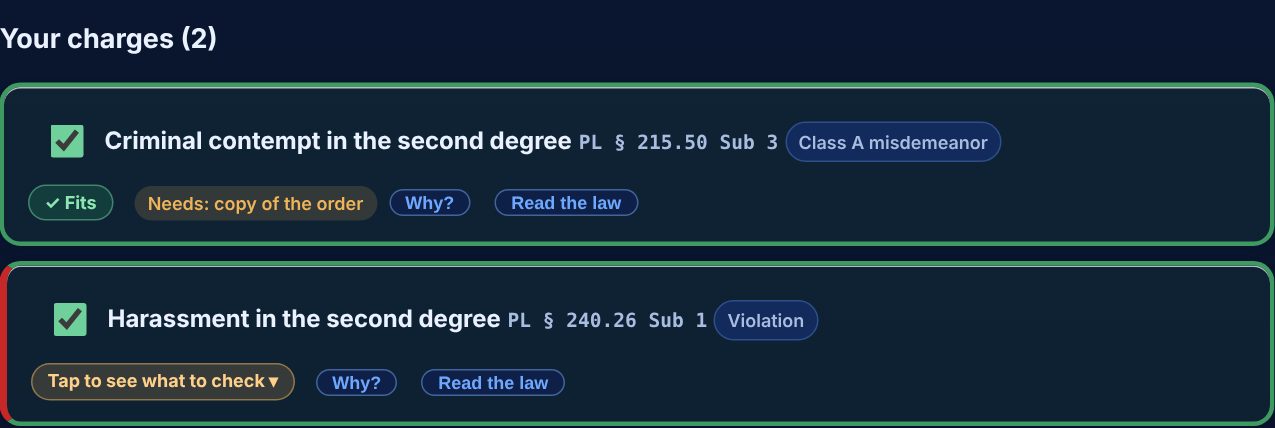
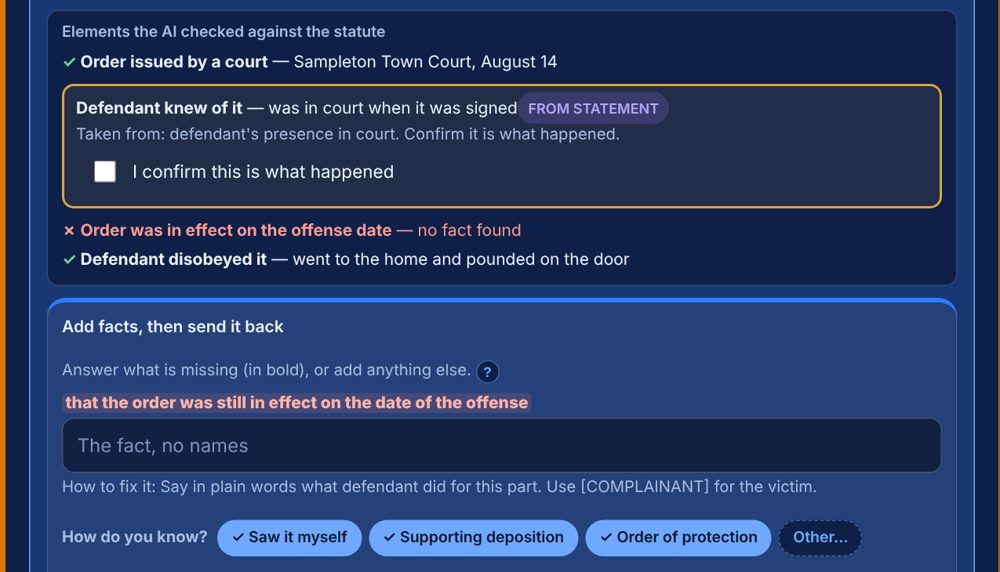
- Every element checked, with anything missing flagged in red
- Charges suggested from the facts, with the reason and the law
- One PDF packet, in the order the court wants it
It checks the charges, not just the forms.
Fast paperwork only matters if the charges are right. BlueDraft looks both ways: what the officer might be missing, and what the facts can't support.
Catches under-charging
When a prior conviction would raise a misdemeanor, such as to aggravated family offense or aggravated contempt, an amber box asks the officer to check before moving on.
Stops over-charging
A charge missing an element is flagged at every step. When the law clearly doesn't allow it, the charge is blocked and the reason is named in plain words.
Flags overlap
Lesser charges a greater charge already covers are marked, so the officer sees it and decides. The officer can always add a charge with a reason.
Checks every element
Each charge is split into the parts the law requires and checked against the statement. One tap opens the exact wording of the statute.
From the statement to the printed packet.
Start the case
Case number and badge. Every document is labeled from the first click.
Paste the statement
As written, or a short scenario. Forms only? Skip ahead.
Names come out
Each name becomes a role before anything goes to the AI.
Review charges
Suggested charges with the reason, and a To Wit for each.
Details once
Everything the forms need, asked in one place, one time.
Print the packet
Court receipt on top, every form in the court's order, one PDF.
The officer stays in control. Nothing moves on until the officer has read and approved it, and anything can be typed over before printing.
What the officer sees.
A domestic case: a stay-away order broken at the victim's door.
The names never leave the computer.
Before the AI sees a word, BlueDraft swaps every name for a role and flags addresses, plates and numbers. The real names stay on the department's computer and go back in at the end.
The statement
Jane Smith said John Doe came to 12 Elm St.Roles only
the victim said defendant A came to the residenceNames put back
Every form filled with the real names, on the department's own machinePrefer no AI at all? Offline mode works start to finish. Nothing is saved unless the officer saves the case file to their own computer.
Set up for your department.
Your name, badge and forms
Your letterhead, chief, forms and court or courts, built in.
Court-ready To Wits
Tight and element by element, written from the facts.
Domestic incident help
Order of protection details entered once and carried to every charge that needs them.
The whole arrest packet
Appearance ticket, DIR, fingerprint sheet and more, in court-receipt order.
Simple to start
One file that opens in the browser on a department computer. No server to run.
Updates without the work
We send law and form updates. After the first install, there's no IT work on your end.

Built by police, for police.
BlueDraft was built on patrol by a New York police sergeant who writes these after every arrest, to fix the paperwork problems officers run into every shift.
Practice on four made-up cases.
A 2-minute tour shows what it does. Then work a case yourself. Nothing is saved or sent anywhere.
The questions chiefs and sergeants ask.
Does it replace the officer, or the DA?
No. BlueDraft drafts. The officer reads, edits and approves every word, and the DA has the final say on what is filed. It's a drafting aid, not a legal opinion.
Where does the information go?
Names, dates of birth, addresses and similar details stay on the department's computer. The AI only sees text with those removed, and you can turn the AI off and work fully offline. Nothing is stored unless the officer saves the case file to their own computer.
Can an officer still add a charge the tool warns about?
Yes, with a written reason, and the warning stays visible through to the final instrument. Only charges the law clearly doesn't allow on the facts given are blocked.
Which states and agencies is it built for?
New York State accusatory instruments and forms, for police departments and sheriff's offices. Each department's version carries its own name, badge, forms and court or courts.
What do we have to install?
One file on the department's computer, opened in a web browser. There's no server to run, no account to create and no software to roll out. We set it up with your department's name, badge, forms and courts before you start.
What does it cost?
Tell us a little about your department using the form below, and we'll get back to you with details. There's no obligation.
Interested for your department?
Tell us who you are and we'll reply personally. A short call or a live walk-through is easy to set up.
- No pressure, no obligation
- Set up with your department's name, badge and forms
- A real reply from a person
Or email BlueDraftAI@gmail.com